Lab 03: Ghosts
Table of contents
Introduction
This lab continues with a similar setup as in Lab01. However, we’re going to be performing a séance where a ghost machine will join our network. To do so, we need to convince hostA that a ghost machine with IP address 10.10.0.10 exists on the network.
Logistics
We will continue with the same set of tools from Lab01, these are namely:
- Wireshark to visually see packets and protocols.
- Install this on your local machine, so you can see things visually.
If you are comfortable with command line, you can also use
tsharkto observe the same packets and protocols, directly on the server machine.scporrsyncwill prove to be useful to obtain packet captures from the server and download them on your local machine. They should be installed by default on your Linux distribution that you are running.
Learning objectives
After completing this lab, you should be able to:
Identify the data link and network layer protocols.
Capture traffic on a network using
tcpdumpand/orscapyand/orlibpcap.Examine network packets captured on the wire.
Craft and send network packets to achieve a certain objective.
Getting the config
You can find the starter setup for this lab under the 02_Lab02 directory of the csse341-labs repository. If you have set up your private repository correctly, you can fetch the latest version of the labs using the following sequence of commands:
Synchronize with the labs remote using
git fetch upstream.Pull the latest changes from the
mainbranch of the class repository:$ git pull upstream mainPush the starter setup to your repository so you can start modifying it:
$ git add 03_Lab03
$ git push origin main
Generating your .env file
Before we spin up our containers, there are some configuration variables that we must generate. To do so, please run the gen_env_file.sh script from the lab repository directory as follows:
$ ./gen_env_file.sh
If run correctly, you will find the following new files:
.env(hidden file - usels -alto see it) contains yourUIDandGIDvariables.connect_*.sha utility script to connect to each container in this lab.
Network topology
In this lab, we will be working with three machines connected to the same local network. They will live on the same subnet and all can access each other directly. The machines are:
hostAwith IP address10.10.0.4hostBwith IP address10.10.0.5attackerwith IP address10.10.0.13
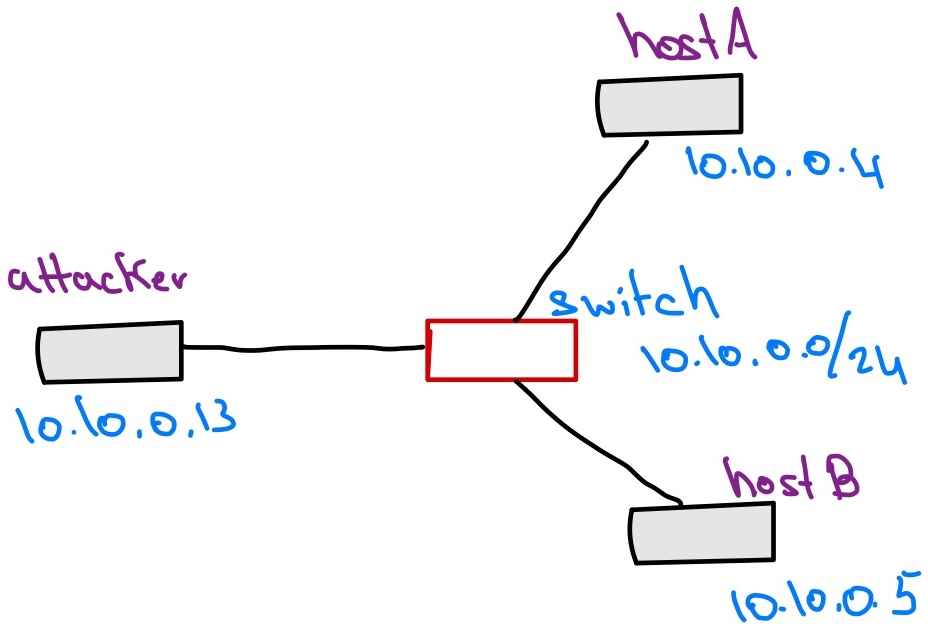
The Séance
We have convinced hostA that a Ghost exists on the network and it has an IPv4 address of 10.10.0.10. Looking at the list of hosts physically connected to the network, the ghost machine does not seem exists. Therefore, hostA decides to run a ping to the ghost machine’s IP address (10.10.0.10). The attacker machine’s goal is to convince hostA that a reply from the ghost has been received.
Your task is to design an experiment and write an exploit that will trick hostA into believing that 10.10.0.10 exists on the network, and that it is none other than the attacker machine. After that, all traffic generated from hostA and going to 10.10.0.10 will actually go to the attacker machine.
In what follows, use the tools we have learned in the previous labs to do the following:
- Describe your exploit using text and/or diagrams. Make sure to list all the steps that the attacker machine must do in order to trick
hostA.- Implement your exploit using your chosen programming language.
On my machine, after implementing the exploit, here’s what happens:
(attacker) $ ./exploit.py
On hostA:
(hostA) $ ping -c3 10.10.0.10
PING 10.10.0.10 (10.10.0.10) 56(84) bytes of data.
	64 bytes from 10.10.0.10: icmp_seq=1 ttl=64 time=29.0 ms
	64 bytes from 10.10.0.10: icmp_seq=2 ttl=64 time=28.0 ms
	64 bytes from 10.10.0.10: icmp_seq=3 ttl=64 time=27.0 ms

	--- 10.10.0.10 ping statistics ---
	3 packets transmitted, 3 received, 0% packet loss, time 2002ms
	rtt min/avg/max/mdev = 27.018/27.997/29.010/0.813 ms
{: .warning } If you see a packet that says Redirect Host (New nexthop: 10.10.0.10), that is okay, it still counts. It has to do with python not being fast enough sometimes (You can clearly see that in the round trip time, rtt, from the sequence above, it is about 28ms on a local, virtual, network).
Hints
Here are some possible things to look out for:
Set up a small experiment and observe the behavior of
hostAwhen it is trying to ping a non-existent host. Specifically, we are interested in the packets that show up at theattackermachine.If you are using
scapywithpython, be aware that it also captures packets that are sent from the machine running the exploit itself. Make sure to ignore those or else you’d fall into an infinite loop.Avoid hard-coding MAC addresses as those might change when you take down and then restart the docker environment. To get the MAC address of a certain interface, you can use
get_if_hwaddr("eth0").You will need to send packets at two different protocols. Examine the documentation for
sendvs.sendp.